왼쪽 사진이 아직 그려지는 중이에요. 사진이 다 보인 뒤에 필터 저장을 다시 눌러 주세요.
수정 버튼이 눌리지 않아요
카드에 「공유 저장소: ○○」라고 적혀 있다면 여러 가게가 같이 쓰는 필터예요. 이 화면에서는 고칠 수 없고, ⋯ > 링크 해제를 누르면 이 가게에서만 따로 고쳐 쓸 수 있어요.
「.cube 파일」, 「텍스처」는 무엇인가요?
사진 보정 프로그램에서 만든 색감 파일을 불러오는 칸이에요. 가지고 있는 파일이 없다면 비워 두면 돼요.
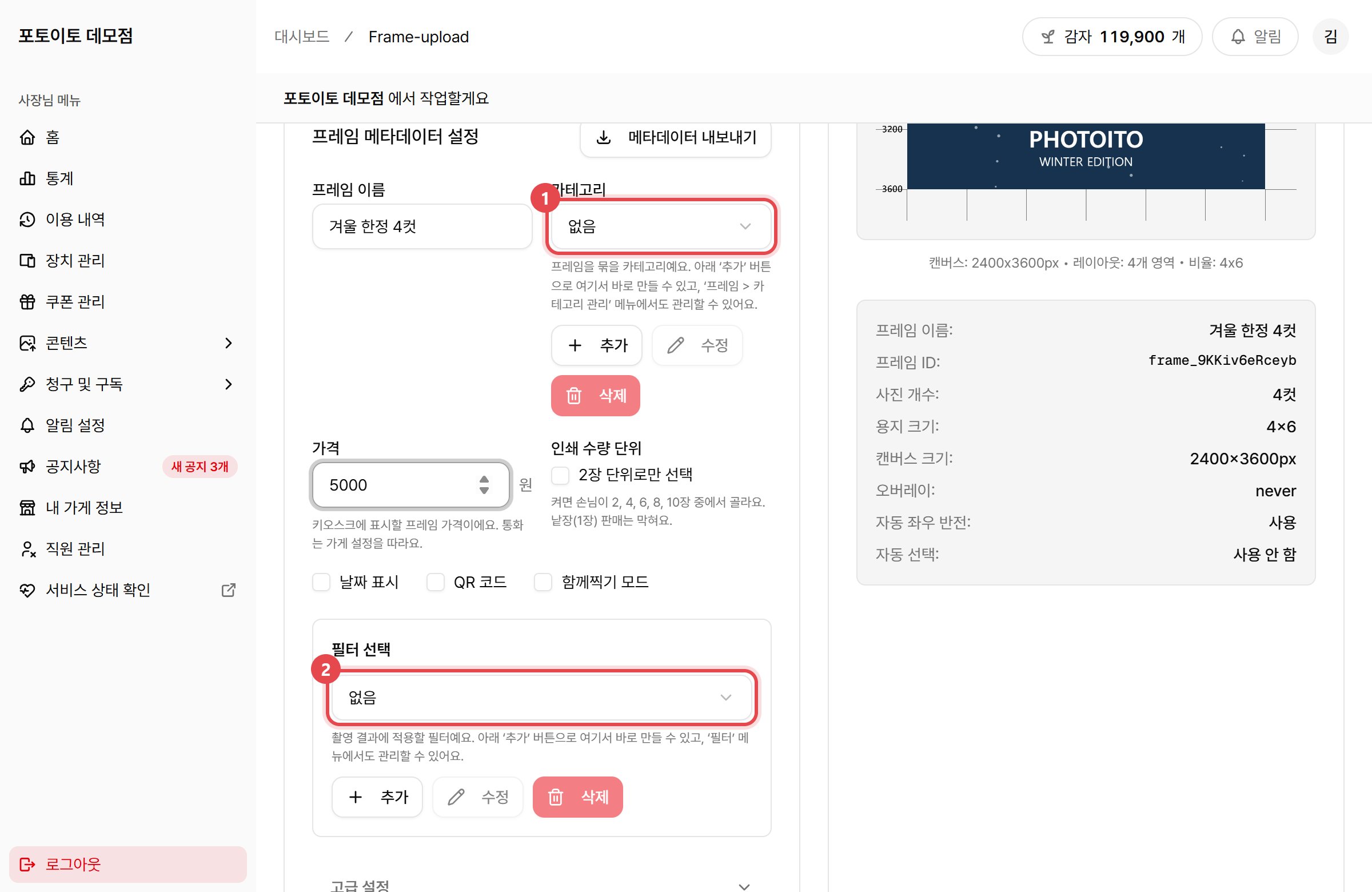
{"docsConfig":{"theme":"aspen","$schema":"https://mintlify.com/docs.json","name":"포토이토 사용자 가이드","description":"포토이토 키오스크를 설치하고, 대시보드로 가게를 운영하는 방법을 안내해요.","colors":{"primary":"#8a6543","light":"#f6dfb7","dark":"#9d7d46"},"logo":{"light":"https://mintcdn.com/photoito/4S4wN-4zPMM09bGe/images/photoito_docs_logo_light.png?fit=max\u0026auto=format\u0026n=4S4wN-4zPMM09bGe\u0026q=85\u0026s=b50e4cd57f8e3898806e54ea565e9ef1","dark":"https://mintcdn.com/photoito/4S4wN-4zPMM09bGe/images/photoito_docs_logo_dark.png?fit=max\u0026auto=format\u0026n=4S4wN-4zPMM09bGe\u0026q=85\u0026s=142370f51be3a9cec352115aee99a228"},"favicon":{"light":"https://mintcdn.com/photoito/4S4wN-4zPMM09bGe/logo/photoito_favicon.svg?fit=max\u0026auto=format\u0026n=4S4wN-4zPMM09bGe\u0026q=85\u0026s=b996073daa1ea040e674608033e18a1e","dark":"https://mintcdn.com/photoito/4S4wN-4zPMM09bGe/logo/photoito_favicon.svg?fit=max\u0026auto=format\u0026n=4S4wN-4zPMM09bGe\u0026q=85\u0026s=b996073daa1ea040e674608033e18a1e"},"navbar":{"links":[{"href":"https://yl706.channel.io","label":"문의하기"}],"primary":{"type":"button","label":"대시보드 열기","href":"https://dashboard.photoito.kr"}},"contextual":{"options":["copy","view","chatgpt","claude","perplexity","mcp","cursor","vscode"],"display":"header"},"styling":{"latex":false},"navigation":{"global":{"anchors":[{"anchor":"홈페이지","icon":"plane-landing-gear","href":"https://www.photoito.kr"},{"anchor":"대시보드","icon":"dashboard","href":"https://dashboard.photoito.kr"}]},"languages":[{"language":"ko","href":""}]}},"deployment":{"deploymentMetadataValue":{"subdomain":"photoito","hasAudioNarration":false,"actualSubdomain":"photoito","customDomains":["docs.photoito.kr"],"gitSource":{"type":"github","owner":"photoito","repo":"docs","deployBranch":"main","contentDirectory":"","isPrivate":false,"mountPath":"","label":""},"entitlements":{"AI_CHAT":{"status":"DISABLED"}},"buildId":"6ad0aa5dd9ce62fdaafa6268","clientVersion":"0.0.4094","searchFilterCounts":[{"language":"ko","tag":"대시보드","count":23},{"language":"ko","tag":"콘텐츠","count":7},{"language":"ko","tag":"가게 운영","count":5},{"language":"ko","tag":"청구 및 구독","count":4},{"language":"ko","tag":"매일 보는 화면","count":3},{"language":"ko","tag":"키오스크","count":2},{"language":"ko","tag":"시작하기","count":2},{"language":"ko","tag":"오류 해결하기","count":2},{"language":"ko","tag":"설치 및 수리","count":1}]},"assistantConfig":{"enableAskAiButton":false,"enableStarterQuestions":false,"enableContextualStarterQuestions":false,"enableAskAiSearchBar":true},"basePath":"","hasChatPermissions":false,"hasWebMcpPermissions":false,"toggles":[{"name":"kill-isr","enabled":true,"variant":{"name":"disabled","enabled":false,"feature_enabled":true},"impressionData":false},{"name":"custom-rbac-roles","enabled":true,"variant":{"name":"disabled","enabled":false,"feature_enabled":true},"impressionData":false},{"name":"agent-mintlify-slack","enabled":true,"variant":{"name":"disabled","enabled":false,"feature_enabled":true},"impressionData":false},{"name":"agent-integrations-settings","enabled":true,"variant":{"name":"disabled","enabled":false,"feature_enabled":true},"impressionData":false},{"name":"rbac-expansion","enabled":true,"variant":{"name":"disabled","enabled":false,"feature_enabled":true},"impressionData":false},{"name":"automations-pr-grouping","enabled":true,"variant":{"name":"disabled","enabled":false,"feature_enabled":true},"impressionData":false},{"name":"custom-prefix","enabled":true,"variant":{"name":"disabled","enabled":false,"feature_enabled":true},"impressionData":false},{"name":"analytics-v7","enabled":true,"variant":{"name":"disabled","enabled":false,"feature_enabled":true},"impressionData":false},{"name":"user-flows-analytics","enabled":true,"variant":{"name":"disabled","enabled":false,"feature_enabled":true},"impressionData":false},{"name":"no-publish-flow","enabled":true,"variant":{"name":"disabled","enabled":false,"feature_enabled":true},"impressionData":false},{"name":"workos-onboarding","enabled":true,"variant":{"name":"disabled","enabled":false,"feature_enabled":true},"impressionData":false},{"name":"llms-txt-v2","enabled":true,"variant":{"name":"disabled","enabled":false,"feature_enabled":true},"impressionData":false},{"name":"snapshot-serving-live","enabled":true,"variant":{"name":"disabled","enabled":false,"feature_enabled":true},"impressionData":false},{"name":"stripTemperatureMiddleware","enabled":true,"variant":{"name":"disabled","enabled":false,"feature_enabled":true},"impressionData":false},{"name":"support-platform-pylon-zendesk","enabled":true,"variant":{"name":"disabled","enabled":false,"feature_enabled":true},"impressionData":false},{"name":"snapshot-serving","enabled":true,"variant":{"name":"disabled","enabled":false,"feature_enabled":true},"impressionData":false},{"name":"instant-rollback","enabled":true,"variant":{"name":"disabled","enabled":false,"feature_enabled":true},"impressionData":false},{"name":"granular-notifications-server","enabled":true,"variant":{"name":"disabled","enabled":false,"feature_enabled":true},"impressionData":false},{"name":"granular-notifications","enabled":true,"variant":{"name":"disabled","enabled":false,"feature_enabled":true},"impressionData":false},{"name":"automations-fable","enabled":true,"variant":{"name":"disabled","enabled":false,"feature_enabled":true},"impressionData":false},{"name":"fixed-ai-action-pricing","enabled":true,"variant":{"name":"disabled","enabled":false,"feature_enabled":true},"impressionData":false},{"name":"automation-resolve-merge-conflict","enabled":true,"variant":{"name":"disabled","enabled":false,"feature_enabled":true},"impressionData":false},{"name":"scoped-publishing","enabled":true,"variant":{"name":"disabled","enabled":false,"feature_enabled":true},"impressionData":false},{"name":"mintql","enabled":true,"variant":{"name":"disabled","enabled":false,"feature_enabled":true},"impressionData":false},{"name":"page-level-analytics","enabled":true,"variant":{"name":"disabled","enabled":false,"feature_enabled":true},"impressionData":false},{"name":"editor-version-history-v2","enabled":true,"variant":{"name":"disabled","enabled":false,"feature_enabled":true},"impressionData":false},{"name":"billing-page-v2","enabled":true,"variant":{"name":"disabled","enabled":false,"feature_enabled":true},"impressionData":false},{"name":"full-page-search","enabled":true,"variant":{"name":"disabled","enabled":false,"feature_enabled":true},"impressionData":false},{"name":"workspace-projects","enabled":true,"variant":{"name":"disabled","enabled":false,"feature_enabled":true},"impressionData":false},{"name":"assistant-v5","enabled":true,"variant":{"name":"disabled","enabled":false,"feature_enabled":true},"impressionData":false},{"name":"fork-pr-previews","enabled":true,"variant":{"name":"disabled","enabled":false,"feature_enabled":true},"impressionData":false},{"name":"revalidation-jwt","enabled":true,"variant":{"name":"disabled","enabled":false,"feature_enabled":true},"impressionData":false},{"name":"workos-sso-scim","enabled":true,"variant":{"name":"disabled","enabled":false,"feature_enabled":true},"impressionData":false},{"name":"hobby-abuse-scan","enabled":true,"variant":{"name":"disabled","enabled":false,"feature_enabled":true},"impressionData":false},{"name":"dashboard-inbox","enabled":true,"variant":{"name":"disabled","enabled":false,"feature_enabled":true},"impressionData":false},{"name":"workos-signup","enabled":true,"variant":{"name":"disabled","enabled":false,"feature_enabled":true},"impressionData":false},{"name":"turbopuffer-dual-write","enabled":true,"variant":{"name":"disabled","enabled":false,"feature_enabled":true},"impressionData":false},{"name":"workos-enabled","enabled":true,"variant":{"name":"disabled","enabled":false,"feature_enabled":true},"impressionData":false},{"name":"approve-review-flow","enabled":true,"variant":{"name":"disabled","enabled":false,"feature_enabled":true},"impressionData":false},{"name":"editor-metadata","enabled":true,"variant":{"name":"disabled","enabled":false,"feature_enabled":true},"impressionData":false},{"name":"sso-setup-deadline-banner","enabled":true,"variant":{"name":"disabled","enabled":false,"feature_enabled":true},"impressionData":false},{"name":"turbopuffer-serve","enabled":true,"variant":{"name":"disabled","enabled":false,"feature_enabled":true},"impressionData":false},{"name":"live-agents","enabled":true,"variant":{"name":"disabled","enabled":false,"feature_enabled":true},"impressionData":false}],"googleFontsInlined":false},"customCss":[],"page":{"pagePath":"dashboard/filters","slug":"/dashboard/filters","pageMetadata":{"title":"필터 관리","description":"촬영한 사진에 자동으로 입힐 보정을 만들어요.","href":"/dashboard/filters"},"description":{"compiledSource":"\"use strict\";\nconst {jsx: _jsx} = arguments[0];\nconst {useMDXComponents: _provideComponents} = arguments[0];\nfunction _createMdxContent(props) {\n const _components = {\n p: \"p\",\n ..._provideComponents(),\n ...props.components\n };\n return _jsx(_components.p, {\n children: \"촬영한 사진에 자동으로 입힐 보정을 만들어요.\"\n });\n}\nfunction MDXContent(props = {}) {\n const {wrapper: MDXLayout} = {\n ..._provideComponents(),\n ...props.components\n };\n return MDXLayout ? _jsx(MDXLayout, {\n ...props,\n children: _jsx(_createMdxContent, {\n ...props\n })\n }) : _createMdxContent(props);\n}\nreturn {\n default: MDXContent\n};\n","frontmatter":{},"scope":{}},"pageType":"default","mdx":{"mdxSource":{"compiledSource":"\"use strict\";const{Fragment:_Fragment,jsx:_jsx,jsxs:_jsxs}=arguments[0];const{useMDXComponents:_provideComponents}=arguments[0];function _createMdxContent(props){const _components={a:`a`,li:`li`,ol:`ol`,p:`p`,strong:`strong`,tbody:`tbody`,td:`td`,th:`th`,thead:`thead`,tr:`tr`,ul:`ul`,..._provideComponents(),...props.components},{Accordion,AccordionGroup,Frame,Heading,Note,OptimizedImage,Step,Steps,Table,Tip}=_components;if(!Accordion)_missingMdxReference(`Accordion`,true);if(!AccordionGroup)_missingMdxReference(`AccordionGroup`,true);if(!Frame)_missingMdxReference(`Frame`,true);if(!Heading)_missingMdxReference(`Heading`,true);if(!Note)_missingMdxReference(`Note`,true);if(!OptimizedImage)_missingMdxReference(`OptimizedImage`,true);if(!Step)_missingMdxReference(`Step`,true);if(!Steps)_missingMdxReference(`Steps`,true);if(!Table)_missingMdxReference(`Table`,true);if(!Tip)_missingMdxReference(`Tip`,true);return _jsxs(_Fragment,{children:[_jsxs(_components.p,{children:[_jsx(_components.strong,{children:`필터`}),`는 촬영한 사진을 자동으로 보정해 주는 설정이에요. 예를 들어 피부를 화사하게 하거나, 필름 사진 같은 색감을 입힐 수 있어요.`]}),`\n`,_jsxs(_components.p,{children:[`왼쪽 메뉴에서 `,_jsx(_components.strong,{children:`콘텐츠 > 필터 관리`}),`를 누르면 열려요.`]}),`\n`,_jsx(Frame,{caption:`필터 관리 화면`,children:_jsx(OptimizedImage,{src:`https://mintcdn.com/photoito/S8gRFIFYQLQ5kc0j/images/ko/filters/list.png?fit=max\u0026auto=format\u0026n=S8gRFIFYQLQ5kc0j\u0026q=85\u0026s=0093110dbe242c848e812062fdaec87d`,alt:`필터 관리 화면. 필터 카드 두 장이 있다.`,\"data-og-width\":`2400`,width:`2400`,\"data-og-height\":`1560`,height:`1560`,\"data-path\":`images/ko/filters/list.png`,\"data-optimize\":`true`,\"data-opv\":`3`,srcset:`https://mintcdn.com/photoito/S8gRFIFYQLQ5kc0j/images/ko/filters/list.png?w=280\u0026fit=max\u0026auto=format\u0026n=S8gRFIFYQLQ5kc0j\u0026q=85\u0026s=e3f3188a486803c17afb2caeb0fcf849 280w, https://mintcdn.com/photoito/S8gRFIFYQLQ5kc0j/images/ko/filters/list.png?w=560\u0026fit=max\u0026auto=format\u0026n=S8gRFIFYQLQ5kc0j\u0026q=85\u0026s=ffbbf3201fba95904b5daa68b7119689 560w, https://mintcdn.com/photoito/S8gRFIFYQLQ5kc0j/images/ko/filters/list.png?w=840\u0026fit=max\u0026auto=format\u0026n=S8gRFIFYQLQ5kc0j\u0026q=85\u0026s=d495462319f4e63f25166363ead31f86 840w, https://mintcdn.com/photoito/S8gRFIFYQLQ5kc0j/images/ko/filters/list.png?w=1100\u0026fit=max\u0026auto=format\u0026n=S8gRFIFYQLQ5kc0j\u0026q=85\u0026s=bd249b64d8b89b1ae4f60980a4e5d5d0 1100w, https://mintcdn.com/photoito/S8gRFIFYQLQ5kc0j/images/ko/filters/list.png?w=1650\u0026fit=max\u0026auto=format\u0026n=S8gRFIFYQLQ5kc0j\u0026q=85\u0026s=01fbf031444101eba12e8346e768b1a1 1650w, https://mintcdn.com/photoito/S8gRFIFYQLQ5kc0j/images/ko/filters/list.png?w=2500\u0026fit=max\u0026auto=format\u0026n=S8gRFIFYQLQ5kc0j\u0026q=85\u0026s=cf03c2276418038d6eeee2964ba07c16 2500w`})}),`\n`,_jsxs(Note,{children:[_jsxs(_components.p,{children:[_jsx(_components.strong,{children:`필터는 손님이 고르는 게 아니에요.`}),` 사장님이 프레임마다 필터를 하나씩 연결해 두면, 손님이 그 프레임을 골랐을 때 자동으로 입혀져요.`]}),_jsxs(_components.p,{children:[`그래서 순서는 두 단계예요: `,_jsx(_components.strong,{children:`① 필터를 만든다 → ② 프레임에 연결한다.`})]})]}),`\n`,_jsx(Heading,{level:`2`,id:`①-필터-만들기`,children:`① 필터 만들기`}),`\n`,_jsxs(Steps,{children:[_jsxs(Step,{title:`「필터 추가」를 눌러요`,children:[_jsx(_components.p,{children:`화면 오른쪽 위에 있어요.`}),_jsx(Frame,{children:_jsx(OptimizedImage,{src:`https://mintcdn.com/photoito/S8gRFIFYQLQ5kc0j/images/ko/filters/add-button.png?fit=max\u0026auto=format\u0026n=S8gRFIFYQLQ5kc0j\u0026q=85\u0026s=16f158babfcf0656293dd47f9b47c6fc`,alt:`필터 관리 화면 오른쪽 위의 필터 추가 버튼에 빨간 표시가 있다.`,\"data-og-width\":`2400`,width:`2400`,\"data-og-height\":`1560`,height:`1560`,\"data-path\":`images/ko/filters/add-button.png`,\"data-optimize\":`true`,\"data-opv\":`3`,srcset:`https://mintcdn.com/photoito/S8gRFIFYQLQ5kc0j/images/ko/filters/add-button.png?w=280\u0026fit=max\u0026auto=format\u0026n=S8gRFIFYQLQ5kc0j\u0026q=85\u0026s=5b40c9be822799a486285dcfdb537a61 280w, https://mintcdn.com/photoito/S8gRFIFYQLQ5kc0j/images/ko/filters/add-button.png?w=560\u0026fit=max\u0026auto=format\u0026n=S8gRFIFYQLQ5kc0j\u0026q=85\u0026s=30ca96dd5d12263392f423621efc7ba9 560w, https://mintcdn.com/photoito/S8gRFIFYQLQ5kc0j/images/ko/filters/add-button.png?w=840\u0026fit=max\u0026auto=format\u0026n=S8gRFIFYQLQ5kc0j\u0026q=85\u0026s=27a323e3586c0c9cd225aff130b02f54 840w, https://mintcdn.com/photoito/S8gRFIFYQLQ5kc0j/images/ko/filters/add-button.png?w=1100\u0026fit=max\u0026auto=format\u0026n=S8gRFIFYQLQ5kc0j\u0026q=85\u0026s=30c090e095cd477c40f2953b317df59d 1100w, https://mintcdn.com/photoito/S8gRFIFYQLQ5kc0j/images/ko/filters/add-button.png?w=1650\u0026fit=max\u0026auto=format\u0026n=S8gRFIFYQLQ5kc0j\u0026q=85\u0026s=526fd8b87a363d2ddca7112277304d77 1650w, https://mintcdn.com/photoito/S8gRFIFYQLQ5kc0j/images/ko/filters/add-button.png?w=2500\u0026fit=max\u0026auto=format\u0026n=S8gRFIFYQLQ5kc0j\u0026q=85\u0026s=1d60515069b719dace7ac5551eb9123e 2500w`})})]}),_jsxs(Step,{title:`필터 이름을 적어요`,children:[_jsx(_components.p,{children:`사장님만 보는 이름이에요. 알아보기 쉽게 지어 주세요. 예: 「화사한 피부」`}),_jsx(Frame,{children:_jsx(OptimizedImage,{src:`https://mintcdn.com/photoito/S8gRFIFYQLQ5kc0j/images/ko/filters/create-name.png?fit=max\u0026auto=format\u0026n=S8gRFIFYQLQ5kc0j\u0026q=85\u0026s=f09909dec603d1fcbd74730460f6962a`,alt:`필터 추가 창. 필터 이름 칸에 빨간 표시가 있다.`,\"data-og-width\":`2400`,width:`2400`,\"data-og-height\":`1560`,height:`1560`,\"data-path\":`images/ko/filters/create-name.png`,\"data-optimize\":`true`,\"data-opv\":`3`,srcset:`https://mintcdn.com/photoito/S8gRFIFYQLQ5kc0j/images/ko/filters/create-name.png?w=280\u0026fit=max\u0026auto=format\u0026n=S8gRFIFYQLQ5kc0j\u0026q=85\u0026s=dd376b67025ab629e4db743813f7494b 280w, https://mintcdn.com/photoito/S8gRFIFYQLQ5kc0j/images/ko/filters/create-name.png?w=560\u0026fit=max\u0026auto=format\u0026n=S8gRFIFYQLQ5kc0j\u0026q=85\u0026s=e1442cadc40ebf16acd643d400d0f2e3 560w, https://mintcdn.com/photoito/S8gRFIFYQLQ5kc0j/images/ko/filters/create-name.png?w=840\u0026fit=max\u0026auto=format\u0026n=S8gRFIFYQLQ5kc0j\u0026q=85\u0026s=7421f1f6bf269a2905192360db1fdf53 840w, https://mintcdn.com/photoito/S8gRFIFYQLQ5kc0j/images/ko/filters/create-name.png?w=1100\u0026fit=max\u0026auto=format\u0026n=S8gRFIFYQLQ5kc0j\u0026q=85\u0026s=a5261884a39351c44491036c14280959 1100w, https://mintcdn.com/photoito/S8gRFIFYQLQ5kc0j/images/ko/filters/create-name.png?w=1650\u0026fit=max\u0026auto=format\u0026n=S8gRFIFYQLQ5kc0j\u0026q=85\u0026s=efa0061ba141cb1fd345ad7e2ebc3d0a 1650w, https://mintcdn.com/photoito/S8gRFIFYQLQ5kc0j/images/ko/filters/create-name.png?w=2500\u0026fit=max\u0026auto=format\u0026n=S8gRFIFYQLQ5kc0j\u0026q=85\u0026s=b3be2fa2bf0593ecd765f0df53b92be3 2500w`})}),_jsx(_components.p,{children:`왼쪽 사진은 미리보기용 샘플이에요. 오른쪽 막대를 움직이면 이 사진이 바로 바뀌어요.`})]}),_jsxs(Step,{title:`오른쪽 막대를 움직여 보정해요`,children:[_jsx(_components.p,{children:`막대를 오른쪽으로 밀수록 효과가 강해져요. 이름이 영어로 적혀 있는데, 자주 쓰는 것은 아래 일곱 가지예요.`}),_jsxs(Table,{children:[_jsx(_components.thead,{children:_jsxs(_components.tr,{children:[_jsx(_components.th,{children:`화면에 적힌 이름`}),_jsx(_components.th,{children:`하는 일`})]})}),_jsxs(_components.tbody,{children:[_jsxs(_components.tr,{children:[_jsx(_components.td,{children:`skin_smoothing`}),_jsx(_components.td,{children:`피부를 매끈하게`})]}),_jsxs(_components.tr,{children:[_jsx(_components.td,{children:`whitening`}),_jsx(_components.td,{children:`피부를 밝게`})]}),_jsxs(_components.tr,{children:[_jsx(_components.td,{children:`sharpen`}),_jsx(_components.td,{children:`사진을 또렷하게`})]}),_jsxs(_components.tr,{children:[_jsx(_components.td,{children:`brightness`}),_jsx(_components.td,{children:`전체를 밝게 또는 어둡게`})]}),_jsxs(_components.tr,{children:[_jsx(_components.td,{children:`contrast`}),_jsx(_components.td,{children:`밝은 곳과 어두운 곳의 차이를 크게`})]}),_jsxs(_components.tr,{children:[_jsx(_components.td,{children:`exposure`}),_jsx(_components.td,{children:`빛을 더 받은 것처럼 밝게`})]}),_jsxs(_components.tr,{children:[_jsx(_components.td,{children:`saturation`}),_jsx(_components.td,{children:`색을 진하게 또는 연하게`})]})]})]}),_jsx(Frame,{caption:`피부를 매끈하고 밝게 한 예. 위쪽 「적용된 효과」에 바꾼 항목이 모여요.`,children:_jsx(OptimizedImage,{src:`https://mintcdn.com/photoito/S8gRFIFYQLQ5kc0j/images/ko/filters/create-sliders.png?fit=max\u0026auto=format\u0026n=S8gRFIFYQLQ5kc0j\u0026q=85\u0026s=bc3643fd341b7505ed48720e20cfc8fc`,alt:`필터 추가 창. skin_smoothing과 whitening, brightness 막대가 오른쪽으로 옮겨져 있고 적용된 효과에 세 항목이 표시된다.`,\"data-og-width\":`2400`,width:`2400`,\"data-og-height\":`1560`,height:`1560`,\"data-path\":`images/ko/filters/create-sliders.png`,\"data-optimize\":`true`,\"data-opv\":`3`,srcset:`https://mintcdn.com/photoito/S8gRFIFYQLQ5kc0j/images/ko/filters/create-sliders.png?w=280\u0026fit=max\u0026auto=format\u0026n=S8gRFIFYQLQ5kc0j\u0026q=85\u0026s=1b57a5049e4b27678ce85350a7470e2b 280w, https://mintcdn.com/photoito/S8gRFIFYQLQ5kc0j/images/ko/filters/create-sliders.png?w=560\u0026fit=max\u0026auto=format\u0026n=S8gRFIFYQLQ5kc0j\u0026q=85\u0026s=48a65a79ceb5a9b0f15ae7db453d6970 560w, https://mintcdn.com/photoito/S8gRFIFYQLQ5kc0j/images/ko/filters/create-sliders.png?w=840\u0026fit=max\u0026auto=format\u0026n=S8gRFIFYQLQ5kc0j\u0026q=85\u0026s=a5773f1a13b24735f19ac2774f7551a9 840w, https://mintcdn.com/photoito/S8gRFIFYQLQ5kc0j/images/ko/filters/create-sliders.png?w=1100\u0026fit=max\u0026auto=format\u0026n=S8gRFIFYQLQ5kc0j\u0026q=85\u0026s=5c625cb555f8b4e0fc966667f0af0c5a 1100w, https://mintcdn.com/photoito/S8gRFIFYQLQ5kc0j/images/ko/filters/create-sliders.png?w=1650\u0026fit=max\u0026auto=format\u0026n=S8gRFIFYQLQ5kc0j\u0026q=85\u0026s=66fb2c3e9b3ddddd4c01f743dc671387 1650w, https://mintcdn.com/photoito/S8gRFIFYQLQ5kc0j/images/ko/filters/create-sliders.png?w=2500\u0026fit=max\u0026auto=format\u0026n=S8gRFIFYQLQ5kc0j\u0026q=85\u0026s=fcec7f130965f05c2b316e5ee5777177 2500w`})}),_jsx(Tip,{children:_jsxs(_components.p,{children:[`처음에는 `,_jsx(_components.strong,{children:`skin_smoothing`}),`과 `,_jsx(_components.strong,{children:`whitening`}),` 두 개만 조금 올려 보세요. 너무 많이 올리면 얼굴이 부자연스러워져요.`]})}),_jsx(_components.p,{children:`나머지 항목(TONE, EFFECTS, FILM 등)은 사진 보정에 익숙한 분을 위한 것이에요. 건드리지 않아도 돼요.`})]}),_jsxs(Step,{title:`보정 전과 비교해 봐요`,children:[_jsxs(_components.p,{children:[`사진 오른쪽 아래 `,_jsx(_components.strong,{children:`나란히 비교`}),`를 누르면 왼쪽에 원본, 오른쪽에 보정한 사진이 나란히 보여요.`]}),_jsx(Frame,{children:_jsx(OptimizedImage,{src:`https://mintcdn.com/photoito/S8gRFIFYQLQ5kc0j/images/ko/filters/create-compare.png?fit=max\u0026auto=format\u0026n=S8gRFIFYQLQ5kc0j\u0026q=85\u0026s=e54655040b16d02b012b98f1f08fa237`,alt:`필터 추가 창. 왼쪽에 원본, 오른쪽에 수정본 사진이 나란히 보인다.`,\"data-og-width\":`2400`,width:`2400`,\"data-og-height\":`1560`,height:`1560`,\"data-path\":`images/ko/filters/create-compare.png`,\"data-optimize\":`true`,\"data-opv\":`3`,srcset:`https://mintcdn.com/photoito/S8gRFIFYQLQ5kc0j/images/ko/filters/create-compare.png?w=280\u0026fit=max\u0026auto=format\u0026n=S8gRFIFYQLQ5kc0j\u0026q=85\u0026s=ccb8e03ef05d240cfed9afdb0a5af955 280w, https://mintcdn.com/photoito/S8gRFIFYQLQ5kc0j/images/ko/filters/create-compare.png?w=560\u0026fit=max\u0026auto=format\u0026n=S8gRFIFYQLQ5kc0j\u0026q=85\u0026s=cce9446cc65eb4270364f86c945ef407 560w, https://mintcdn.com/photoito/S8gRFIFYQLQ5kc0j/images/ko/filters/create-compare.png?w=840\u0026fit=max\u0026auto=format\u0026n=S8gRFIFYQLQ5kc0j\u0026q=85\u0026s=4b71f7574abc6b0a66f99cbe9adbd85d 840w, https://mintcdn.com/photoito/S8gRFIFYQLQ5kc0j/images/ko/filters/create-compare.png?w=1100\u0026fit=max\u0026auto=format\u0026n=S8gRFIFYQLQ5kc0j\u0026q=85\u0026s=243e509d02db414de234e2219e2a8d45 1100w, https://mintcdn.com/photoito/S8gRFIFYQLQ5kc0j/images/ko/filters/create-compare.png?w=1650\u0026fit=max\u0026auto=format\u0026n=S8gRFIFYQLQ5kc0j\u0026q=85\u0026s=0fd8ad628638088bac304be33990f09d 1650w, https://mintcdn.com/photoito/S8gRFIFYQLQ5kc0j/images/ko/filters/create-compare.png?w=2500\u0026fit=max\u0026auto=format\u0026n=S8gRFIFYQLQ5kc0j\u0026q=85\u0026s=7f1e17eb1dc9a3a2319e0a29063d448e 2500w`})})]}),_jsxs(Step,{title:`「필터 저장」을 눌러요`,children:[_jsx(_components.p,{children:`창을 아래로 내리면 오른쪽 아래에 있어요.`}),_jsx(Frame,{children:_jsx(OptimizedImage,{src:`https://mintcdn.com/photoito/S8gRFIFYQLQ5kc0j/images/ko/filters/create-save.png?fit=max\u0026auto=format\u0026n=S8gRFIFYQLQ5kc0j\u0026q=85\u0026s=f7d736408869acdaf8a612c71aba4889`,alt:`필터 추가 창 아래쪽의 필터 저장 버튼에 빨간 표시가 있다.`,\"data-og-width\":`2400`,width:`2400`,\"data-og-height\":`1560`,height:`1560`,\"data-path\":`images/ko/filters/create-save.png`,\"data-optimize\":`true`,\"data-opv\":`3`,srcset:`https://mintcdn.com/photoito/S8gRFIFYQLQ5kc0j/images/ko/filters/create-save.png?w=280\u0026fit=max\u0026auto=format\u0026n=S8gRFIFYQLQ5kc0j\u0026q=85\u0026s=6d19569d361ffdb89a466ed37da9a260 280w, https://mintcdn.com/photoito/S8gRFIFYQLQ5kc0j/images/ko/filters/create-save.png?w=560\u0026fit=max\u0026auto=format\u0026n=S8gRFIFYQLQ5kc0j\u0026q=85\u0026s=3426432c26f78ee766a41cabb52b345f 560w, https://mintcdn.com/photoito/S8gRFIFYQLQ5kc0j/images/ko/filters/create-save.png?w=840\u0026fit=max\u0026auto=format\u0026n=S8gRFIFYQLQ5kc0j\u0026q=85\u0026s=9cc2a50b9187a43eaafdd0643bfee7a4 840w, https://mintcdn.com/photoito/S8gRFIFYQLQ5kc0j/images/ko/filters/create-save.png?w=1100\u0026fit=max\u0026auto=format\u0026n=S8gRFIFYQLQ5kc0j\u0026q=85\u0026s=26ac2161f97a801136cc72315cf60550 1100w, https://mintcdn.com/photoito/S8gRFIFYQLQ5kc0j/images/ko/filters/create-save.png?w=1650\u0026fit=max\u0026auto=format\u0026n=S8gRFIFYQLQ5kc0j\u0026q=85\u0026s=6b7ed9edde086ea2563906c142100cff 1650w, https://mintcdn.com/photoito/S8gRFIFYQLQ5kc0j/images/ko/filters/create-save.png?w=2500\u0026fit=max\u0026auto=format\u0026n=S8gRFIFYQLQ5kc0j\u0026q=85\u0026s=29c76d079b228553a75135a4662238ad 2500w`})})]})]}),`\n`,_jsx(Heading,{level:`3`,id:`더-쉽게-만드는-방법`,children:`더 쉽게 만드는 방법`}),`\n`,_jsx(_components.p,{children:`막대를 하나하나 맞추기 어렵다면, 사진 아래에 있는 두 가지를 써 보세요.`}),`\n`,_jsx(Frame,{children:_jsx(OptimizedImage,{src:`https://mintcdn.com/photoito/S8gRFIFYQLQ5kc0j/images/ko/filters/create-samples.png?fit=max\u0026auto=format\u0026n=S8gRFIFYQLQ5kc0j\u0026q=85\u0026s=cea40b843d3933e5743bccb239026469`,alt:`필터 추가 창. 샘플 사진 고르는 줄에 1번, 레퍼런스로 자동 생성에 2번 표시가 있다.`,\"data-og-width\":`2400`,width:`2400`,\"data-og-height\":`1560`,height:`1560`,\"data-path\":`images/ko/filters/create-samples.png`,\"data-optimize\":`true`,\"data-opv\":`3`,srcset:`https://mintcdn.com/photoito/S8gRFIFYQLQ5kc0j/images/ko/filters/create-samples.png?w=280\u0026fit=max\u0026auto=format\u0026n=S8gRFIFYQLQ5kc0j\u0026q=85\u0026s=b9296b6f7ec403f61cdd18c4bbf3f9ce 280w, https://mintcdn.com/photoito/S8gRFIFYQLQ5kc0j/images/ko/filters/create-samples.png?w=560\u0026fit=max\u0026auto=format\u0026n=S8gRFIFYQLQ5kc0j\u0026q=85\u0026s=12f2a3c111cfb366c178f4b82a95a404 560w, https://mintcdn.com/photoito/S8gRFIFYQLQ5kc0j/images/ko/filters/create-samples.png?w=840\u0026fit=max\u0026auto=format\u0026n=S8gRFIFYQLQ5kc0j\u0026q=85\u0026s=43fc3d1f360f8df6a88bd043d0cde5dd 840w, https://mintcdn.com/photoito/S8gRFIFYQLQ5kc0j/images/ko/filters/create-samples.png?w=1100\u0026fit=max\u0026auto=format\u0026n=S8gRFIFYQLQ5kc0j\u0026q=85\u0026s=1ff45612a8f1d22b42072d2224a243d9 1100w, https://mintcdn.com/photoito/S8gRFIFYQLQ5kc0j/images/ko/filters/create-samples.png?w=1650\u0026fit=max\u0026auto=format\u0026n=S8gRFIFYQLQ5kc0j\u0026q=85\u0026s=e204681724646fef84d4bc7a1cbb8d39 1650w, https://mintcdn.com/photoito/S8gRFIFYQLQ5kc0j/images/ko/filters/create-samples.png?w=2500\u0026fit=max\u0026auto=format\u0026n=S8gRFIFYQLQ5kc0j\u0026q=85\u0026s=defec104a128f9617d5c48cf8797e972 2500w`})}),`\n`,_jsxs(_components.ol,{children:[`\n`,_jsxs(_components.li,{children:[_jsx(_components.strong,{children:`샘플1 · 샘플2 · 샘플3 · 내 사진`}),`: 미리보기 사진을 바꿔요. `,_jsx(_components.strong,{children:`내 사진`}),`을 누르면 우리 가게에서 찍은 사진으로 확인할 수 있어서, 실제 결과와 가장 비슷하게 볼 수 있어요.`]}),`\n`,_jsxs(_components.li,{children:[_jsx(_components.strong,{children:`레퍼런스로 자동 생성`}),`: 마음에 드는 느낌의 사진을 한 장 올리면, 그 사진과 비슷한 색감이 나오도록 막대를 알아서 맞춰 줘요.`]}),`\n`]}),`\n`,_jsxs(_components.p,{children:[_jsx(_components.strong,{children:`레퍼런스로 자동 생성`}),`은 이렇게 써요.`]}),`\n`,_jsxs(Steps,{children:[_jsx(Step,{title:`「레퍼런스로 자동 생성」을 눌러 펼쳐요`}),_jsx(Step,{title:`닮고 싶은 사진을 올려요`,children:_jsxs(_components.p,{children:[_jsx(_components.strong,{children:`레퍼런스 이미지`}),` 칸을 눌러 사진을 골라요.`]})}),_jsx(Step,{title:`「분석」을 눌러요`,children:_jsx(_components.p,{children:`잠시 기다리면 결과가 나와요.`})}),_jsx(Step,{title:`「슬라이더에 적용」을 눌러요`,children:_jsx(_components.p,{children:`막대가 자동으로 맞춰져요. 그 뒤에 막대를 직접 움직여 조금 더 다듬을 수 있어요.`})})]}),`\n`,_jsx(Heading,{level:`2`,id:`②-프레임에-연결하기`,children:`② 프레임에 연결하기`}),`\n`,_jsx(_components.p,{children:`만든 필터는 프레임에 연결해야 쓰여요.`}),`\n`,_jsxs(Steps,{children:[_jsx(Step,{title:`프레임 관리로 가요`,children:_jsxs(_components.p,{children:[`왼쪽 메뉴에서 `,_jsx(_components.strong,{children:`콘텐츠 > 프레임 관리`}),`를 눌러요.`]})}),_jsx(Step,{title:`연결할 프레임의 「수정」을 눌러요`}),_jsxs(Step,{title:`「필터 선택」 칸에서 고르고 저장해요`,children:[_jsxs(_components.p,{children:[`화면을 아래로 내려 `,_jsx(_components.strong,{children:`필터 선택`}),` 칸(2번)에서 필터를 고른 뒤, 오른쪽 위 `,_jsx(_components.strong,{children:`저장`}),`을 눌러요.`]}),_jsx(Frame,{children:_jsx(OptimizedImage,{src:`https://mintcdn.com/photoito/S8gRFIFYQLQ5kc0j/images/ko/frames/upload-category-filter.png?fit=max\u0026auto=format\u0026n=S8gRFIFYQLQ5kc0j\u0026q=85\u0026s=655d9b72c313cd7018fb8c47037995fa`,alt:`프레임 설정 화면. 필터 선택 칸에 2번 표시가 있다.`,\"data-og-width\":`2400`,width:`2400`,\"data-og-height\":`1560`,height:`1560`,\"data-path\":`images/ko/frames/upload-category-filter.png`,\"data-optimize\":`true`,\"data-opv\":`3`,srcset:`https://mintcdn.com/photoito/S8gRFIFYQLQ5kc0j/images/ko/frames/upload-category-filter.png?w=280\u0026fit=max\u0026auto=format\u0026n=S8gRFIFYQLQ5kc0j\u0026q=85\u0026s=024bd707e61a39d62f6762e5c77c11cf 280w, https://mintcdn.com/photoito/S8gRFIFYQLQ5kc0j/images/ko/frames/upload-category-filter.png?w=560\u0026fit=max\u0026auto=format\u0026n=S8gRFIFYQLQ5kc0j\u0026q=85\u0026s=3c35dd62dc08425b8192d6d430e94a4e 560w, https://mintcdn.com/photoito/S8gRFIFYQLQ5kc0j/images/ko/frames/upload-category-filter.png?w=840\u0026fit=max\u0026auto=format\u0026n=S8gRFIFYQLQ5kc0j\u0026q=85\u0026s=9bcde16a97acf826225ae4e69f234fc9 840w, https://mintcdn.com/photoito/S8gRFIFYQLQ5kc0j/images/ko/frames/upload-category-filter.png?w=1100\u0026fit=max\u0026auto=format\u0026n=S8gRFIFYQLQ5kc0j\u0026q=85\u0026s=3243ad7aa1796798c7ad7573c744a774 1100w, https://mintcdn.com/photoito/S8gRFIFYQLQ5kc0j/images/ko/frames/upload-category-filter.png?w=1650\u0026fit=max\u0026auto=format\u0026n=S8gRFIFYQLQ5kc0j\u0026q=85\u0026s=fd0e368baba655b1648257ca1085becc 1650w, https://mintcdn.com/photoito/S8gRFIFYQLQ5kc0j/images/ko/frames/upload-category-filter.png?w=2500\u0026fit=max\u0026auto=format\u0026n=S8gRFIFYQLQ5kc0j\u0026q=85\u0026s=3570ad4d7d25c78e7567db15ed8c938b 2500w`})})]})]}),`\n`,_jsxs(_components.p,{children:[`마지막으로 `,_jsx(_components.strong,{children:`키오스크에서 새로고침`}),`을 한 번 눌러 주세요. 필터는 프레임과 함께 키오스크로 들어가요. 방법은 `,_jsx(_components.a,{href:`/dashboard/frames#%ED%82%A4%EC%98%A4%EC%8A%A4%ED%81%AC%EC%97%90%EC%84%9C-%ED%94%84%EB%A0%88%EC%9E%84-%EC%BC%9C%EA%B8%B0`,children:`키오스크에서 프레임 켜기`}),`의 1~3단계와 같아요.`]}),`\n`,_jsx(Frame,{caption:`키오스크의 프레임 관리 화면. 프레임마다 연결된 필터 이름이 보라색으로 표시돼요.`,children:_jsx(OptimizedImage,{src:`https://mintcdn.com/photoito/S8gRFIFYQLQ5kc0j/images/ko/kiosk-frames/before-refresh.png?fit=max\u0026auto=format\u0026n=S8gRFIFYQLQ5kc0j\u0026q=85\u0026s=c6f17d27b67ddc80b296e98cfed0965b`,alt:`키오스크의 프레임 관리 화면. 첫 번째 프레임에 필터: 뽀샤시 화사하게 라는 표시가 있다.`,\"data-og-width\":`2560`,width:`2560`,\"data-og-height\":`1600`,height:`1600`,\"data-path\":`images/ko/kiosk-frames/before-refresh.png`,\"data-optimize\":`true`,\"data-opv\":`3`,srcset:`https://mintcdn.com/photoito/S8gRFIFYQLQ5kc0j/images/ko/kiosk-frames/before-refresh.png?w=280\u0026fit=max\u0026auto=format\u0026n=S8gRFIFYQLQ5kc0j\u0026q=85\u0026s=9e98429b95550e94cd12aa3ba125a952 280w, https://mintcdn.com/photoito/S8gRFIFYQLQ5kc0j/images/ko/kiosk-frames/before-refresh.png?w=560\u0026fit=max\u0026auto=format\u0026n=S8gRFIFYQLQ5kc0j\u0026q=85\u0026s=0b9832132e51f7678b4363e17151a970 560w, https://mintcdn.com/photoito/S8gRFIFYQLQ5kc0j/images/ko/kiosk-frames/before-refresh.png?w=840\u0026fit=max\u0026auto=format\u0026n=S8gRFIFYQLQ5kc0j\u0026q=85\u0026s=d06ff0ae19d34bffe4e7d3715b310059 840w, https://mintcdn.com/photoito/S8gRFIFYQLQ5kc0j/images/ko/kiosk-frames/before-refresh.png?w=1100\u0026fit=max\u0026auto=format\u0026n=S8gRFIFYQLQ5kc0j\u0026q=85\u0026s=5af0a898752efeed2dee85154e96abc6 1100w, https://mintcdn.com/photoito/S8gRFIFYQLQ5kc0j/images/ko/kiosk-frames/before-refresh.png?w=1650\u0026fit=max\u0026auto=format\u0026n=S8gRFIFYQLQ5kc0j\u0026q=85\u0026s=b3348c7e97cf496a27fa5fb70e33e3ec 1650w, https://mintcdn.com/photoito/S8gRFIFYQLQ5kc0j/images/ko/kiosk-frames/before-refresh.png?w=2500\u0026fit=max\u0026auto=format\u0026n=S8gRFIFYQLQ5kc0j\u0026q=85\u0026s=2c91969921fefa953236995f47a46580 2500w`})}),`\n`,_jsx(_components.p,{children:`이제 손님이 이 프레임을 고르면 사진에 필터가 입혀져요.`}),`\n`,_jsx(Note,{children:_jsx(_components.p,{children:`프레임을 수정하고 저장하면 감자가 100개 들어요. 필터를 만들거나 고치는 데는 감자가 들지 않아요.`})}),`\n`,_jsx(Heading,{level:`3`,id:`프레임을-올리면서-바로-만들고-연결하기`,children:`프레임을 올리면서 바로 만들고 연결하기`}),`\n`,_jsxs(_components.p,{children:[`필터를 미리 만들어 두지 않았어도 괜찮아요. 프레임을 올리는 화면에서 `,_jsx(_components.strong,{children:`필터 선택`}),` 칸 아래 `,_jsx(_components.strong,{children:`추가`}),`를 누르면 그 자리에서 필터를 만들 수 있어요. 저장하면 그 필터가 프레임에 바로 연결돼서, ①과 ②를 한 번에 끝낼 수 있어요.`]}),`\n`,_jsx(Frame,{children:_jsx(OptimizedImage,{src:`https://mintcdn.com/photoito/S8gRFIFYQLQ5kc0j/images/ko/frames/inline-filter-dialog.png?fit=max\u0026auto=format\u0026n=S8gRFIFYQLQ5kc0j\u0026q=85\u0026s=5aa287ffb3fc716d88630eef7f0052d0`,alt:`프레임 화면 위에 뜬 필터 추가 창.`,\"data-og-width\":`2400`,width:`2400`,\"data-og-height\":`1560`,height:`1560`,\"data-path\":`images/ko/frames/inline-filter-dialog.png`,\"data-optimize\":`true`,\"data-opv\":`3`,srcset:`https://mintcdn.com/photoito/S8gRFIFYQLQ5kc0j/images/ko/frames/inline-filter-dialog.png?w=280\u0026fit=max\u0026auto=format\u0026n=S8gRFIFYQLQ5kc0j\u0026q=85\u0026s=ba7486e82bfdcc72c8482b5fc2296a25 280w, https://mintcdn.com/photoito/S8gRFIFYQLQ5kc0j/images/ko/frames/inline-filter-dialog.png?w=560\u0026fit=max\u0026auto=format\u0026n=S8gRFIFYQLQ5kc0j\u0026q=85\u0026s=558a501100980d6371f697df39b3acab 560w, https://mintcdn.com/photoito/S8gRFIFYQLQ5kc0j/images/ko/frames/inline-filter-dialog.png?w=840\u0026fit=max\u0026auto=format\u0026n=S8gRFIFYQLQ5kc0j\u0026q=85\u0026s=7bc68309094247400faceafa3ac4b0d0 840w, https://mintcdn.com/photoito/S8gRFIFYQLQ5kc0j/images/ko/frames/inline-filter-dialog.png?w=1100\u0026fit=max\u0026auto=format\u0026n=S8gRFIFYQLQ5kc0j\u0026q=85\u0026s=d1c8e0bb6a93550173deff15175ebb05 1100w, https://mintcdn.com/photoito/S8gRFIFYQLQ5kc0j/images/ko/frames/inline-filter-dialog.png?w=1650\u0026fit=max\u0026auto=format\u0026n=S8gRFIFYQLQ5kc0j\u0026q=85\u0026s=9dc1c5d8f726d1ab2835caedacb94c63 1650w, https://mintcdn.com/photoito/S8gRFIFYQLQ5kc0j/images/ko/frames/inline-filter-dialog.png?w=2500\u0026fit=max\u0026auto=format\u0026n=S8gRFIFYQLQ5kc0j\u0026q=85\u0026s=893a71782754638e65874f6d7fa421a2 2500w`})}),`\n`,_jsxs(_components.p,{children:[`자세한 순서는 `,_jsx(_components.a,{href:`/dashboard/frames#%EC%9D%B4-%ED%99%94%EB%A9%B4%EC%97%90%EC%84%9C-%EC%B9%B4%ED%85%8C%EA%B3%A0%EB%A6%AC%C2%B7%ED%95%84%ED%84%B0-%EB%B0%94%EB%A1%9C-%EB%A7%8C%EB%93%A4%EA%B8%B0`,children:`프레임 관리 > 이 화면에서 카테고리·필터 바로 만들기`}),`에 있어요.`]}),`\n`,_jsx(Heading,{level:`2`,id:`필터-고치기-끄기-지우기`,children:`필터 고치기, 끄기, 지우기`}),`\n`,_jsx(Frame,{children:_jsx(OptimizedImage,{src:`https://mintcdn.com/photoito/S8gRFIFYQLQ5kc0j/images/ko/filters/card-controls.png?fit=max\u0026auto=format\u0026n=S8gRFIFYQLQ5kc0j\u0026q=85\u0026s=f203960497e16ddbb2a254ad14d6c2fa`,alt:`필터 카드의 수정 버튼에 1번, 활성 스위치에 2번 표시가 있다.`,\"data-og-width\":`2400`,width:`2400`,\"data-og-height\":`1560`,height:`1560`,\"data-path\":`images/ko/filters/card-controls.png`,\"data-optimize\":`true`,\"data-opv\":`3`,srcset:`https://mintcdn.com/photoito/S8gRFIFYQLQ5kc0j/images/ko/filters/card-controls.png?w=280\u0026fit=max\u0026auto=format\u0026n=S8gRFIFYQLQ5kc0j\u0026q=85\u0026s=8ff03cea0b94a3ff21fda8e90a4238fa 280w, https://mintcdn.com/photoito/S8gRFIFYQLQ5kc0j/images/ko/filters/card-controls.png?w=560\u0026fit=max\u0026auto=format\u0026n=S8gRFIFYQLQ5kc0j\u0026q=85\u0026s=71a58568ff1873b3bf03baecb66b590b 560w, https://mintcdn.com/photoito/S8gRFIFYQLQ5kc0j/images/ko/filters/card-controls.png?w=840\u0026fit=max\u0026auto=format\u0026n=S8gRFIFYQLQ5kc0j\u0026q=85\u0026s=ebf63d74d45de43791dd69e9245d607e 840w, https://mintcdn.com/photoito/S8gRFIFYQLQ5kc0j/images/ko/filters/card-controls.png?w=1100\u0026fit=max\u0026auto=format\u0026n=S8gRFIFYQLQ5kc0j\u0026q=85\u0026s=71071d7f02b4b2a2b15ed1c86d47dac6 1100w, https://mintcdn.com/photoito/S8gRFIFYQLQ5kc0j/images/ko/filters/card-controls.png?w=1650\u0026fit=max\u0026auto=format\u0026n=S8gRFIFYQLQ5kc0j\u0026q=85\u0026s=918132486050d3a961a2927aa1e5e93b 1650w, https://mintcdn.com/photoito/S8gRFIFYQLQ5kc0j/images/ko/filters/card-controls.png?w=2500\u0026fit=max\u0026auto=format\u0026n=S8gRFIFYQLQ5kc0j\u0026q=85\u0026s=f004250de7abac38d52bd5a7223ae636 2500w`})}),`\n`,_jsxs(_components.ol,{children:[`\n`,_jsxs(_components.li,{children:[_jsx(_components.strong,{children:`수정`}),`: 필터를 다시 조절해요. 저장하면 이 필터를 쓰는 프레임에 모두 반영돼요.`]}),`\n`,_jsxs(_components.li,{children:[_jsx(_components.strong,{children:`활성`}),`: 끄면 이 필터가 키오스크에 전달되지 않아요. 잠깐 쓰지 않을 때 꺼 두세요.`]}),`\n`]}),`\n`,_jsxs(_components.p,{children:[`카드의 `,_jsx(_components.strong,{children:`⋯`}),` 버튼을 누르면 `,_jsx(_components.strong,{children:`복제`}),`와 `,_jsx(_components.strong,{children:`삭제`}),`가 있어요.`]}),`\n`,_jsxs(_components.ul,{children:[`\n`,_jsxs(_components.li,{children:[_jsx(_components.strong,{children:`복제`}),`: 똑같은 필터를 하나 더 만들어요. 조금만 다른 필터를 만들 때 편해요.`]}),`\n`,_jsxs(_components.li,{children:[_jsx(_components.strong,{children:`삭제`}),`: 필터를 지워요. 이 필터를 쓰던 프레임은 필터가 없는 상태로 남아요. 지운 필터는 되살릴 수 없어요.`]}),`\n`]}),`\n`,_jsx(Heading,{level:`2`,id:`잘-안-될-때`,children:`잘 안 될 때`}),`\n`,_jsxs(AccordionGroup,{children:[_jsxs(Accordion,{title:`필터를 연결했는데 사진이 그대로예요`,id:`%EC%88%9C%EC%84%9C%EB%8C%80%EB%A1%9C-%ED%99%95%EC%9D%B8%ED%95%B4-%EB%B3%B4%EC%84%B8%EC%9A%94.-%ED%94%84%EB%A0%88%EC%9E%84%EC%9D%98-%ED%95%84%ED%84%B0-%EC%84%A0%ED%83%9D%EC%97%90-%ED%95%84%ED%84%B0%EA%B0%80-%EA%B3%A8%EB%9D%BC%EC%A0%B8-%EC%9E%88%EB%8A%94%EC%A7%80-%ED%99%95%EC%9D%B8%ED%95%B4%EC%9A%94.-%ED%95%84%ED%84%B0-%EC%B9%B4%EB%93%9C%EC%9D%98-%ED%99%9C%EC%84%B1-%EC%8A%A4%EC%9C%84%EC%B9%98%EA%B0%80-%EC%BC%9C%EC%A0%B8-%EC%9E%88%EB%8A%94%EC%A7%80-%ED%99%95%EC%9D%B8%ED%95%B4%EC%9A%94.-%ED%82%A4%EC%98%A4%EC%8A%A4%ED%81%AC-%EC%84%A4%EC%A0%95-%ED%99%94%EB%A9%B4%EC%9D%98-%ED%94%84%EB%A0%88%EC%9E%84-%EA%B4%80%EB%A6%AC%EC%97%90%EC%84%9C-%EC%83%88%EB%A1%9C%EA%B3%A0%EC%B9%A8%EC%9D%84-%EB%88%8C%EB%A0%80%EB%8A%94%EC%A7%80-%ED%99%95%EC%9D%B8%ED%95%B4%EC%9A%94.-%EA%B7%B8-%ED%94%84%EB%A0%88%EC%9E%84%EC%97%90-%E3%80%8C%ED%95%84%ED%84%B0%3A-%E2%97%8B%E2%97%8B%E3%80%8D%EB%9D%BC%EA%B3%A0-%EB%B3%B4%EB%9D%BC%EC%83%89%EC%9C%BC%EB%A1%9C-%EC%A0%81%ED%98%80-%EC%9E%88%EC%96%B4%EC%95%BC-%ED%95%B4%EC%9A%94.-%ED%82%A4%EC%98%A4%EC%8A%A4%ED%81%AC-%ED%94%84%EB%A1%9C%EA%B7%B8%EB%9E%A8%EC%9D%B4-%EC%98%88%EC%A0%84-%EB%B2%84%EC%A0%84%EC%9D%B4%EB%A9%B4-%ED%95%84%ED%84%B0%EA%B0%80-%EC%A0%81%EC%9A%A9%EB%90%98%EC%A7%80-%EC%95%8A%EC%9D%84-%EC%88%98-%EC%9E%88%EC%96%B4%EC%9A%94.-%ED%82%A4%EC%98%A4%EC%8A%A4%ED%81%AC%EB%A5%BC-%ED%95%9C-%EB%B2%88-%EA%BB%90%EB%8B%A4-%EC%BC%9C%EC%84%9C-%EC%83%88-%EB%B2%84%EC%A0%84%EC%9D%84-%EB%B0%9B%EA%B2%8C-%ED%95%B4-%EC%A3%BC%EC%84%B8%EC%9A%94.-%EB%AA%A8%EB%91%90-%EB%A7%9E%EB%8A%94%EB%8D%B0%EB%8F%84-%EC%95%88-%EB%90%9C%EB%8B%A4%EB%A9%B4-%EC%B1%84%EB%84%90%ED%86%A1%EC%9C%BC%EB%A1%9C-%EB%AC%B8%EC%9D%98%ED%95%B4-%EC%A3%BC%EC%84%B8%EC%9A%94.`,children:[_jsx(_components.p,{children:`순서대로 확인해 보세요.`}),_jsxs(_components.ol,{children:[`\n`,_jsxs(_components.li,{children:[`프레임의 `,_jsx(_components.strong,{children:`필터 선택`}),`에 필터가 골라져 있는지 확인해요.`]}),`\n`,_jsxs(_components.li,{children:[`필터 카드의 `,_jsx(_components.strong,{children:`활성`}),` 스위치가 켜져 있는지 확인해요.`]}),`\n`,_jsxs(_components.li,{children:[`키오스크 설정 화면의 `,_jsx(_components.strong,{children:`프레임 관리`}),`에서 `,_jsx(_components.strong,{children:`새로고침`}),`을 눌렀는지 확인해요. 그 프레임에 「필터: ○○」라고 보라색으로 적혀 있어야 해요.`]}),`\n`,_jsx(_components.li,{children:`키오스크 프로그램이 예전 버전이면 필터가 적용되지 않을 수 있어요. 키오스크를 한 번 껐다 켜서 새 버전을 받게 해 주세요.`}),`\n`,_jsxs(_components.li,{children:[`모두 맞는데도 안 된다면 `,_jsx(_components.a,{href:`/support`,children:`채널톡으로 문의`}),`해 주세요.`]}),`\n`]})]}),_jsx(Accordion,{title:`「미리보기가 준비될 때까지 기다려 주세요」라고 나와요`,id:`-1`,children:_jsxs(_components.p,{children:[`왼쪽 사진이 아직 그려지는 중이에요. 사진이 다 보인 뒤에 `,_jsx(_components.strong,{children:`필터 저장`}),`을 다시 눌러 주세요.`]})}),_jsx(Accordion,{title:`수정 버튼이 눌리지 않아요`,id:`-2`,children:_jsxs(_components.p,{children:[`카드에 「공유 저장소: ○○」라고 적혀 있다면 여러 가게가 같이 쓰는 필터예요. 이 화면에서는 고칠 수 없고, `,_jsx(_components.strong,{children:`⋯ > 링크 해제`}),`를 누르면 이 가게에서만 따로 고쳐 쓸 수 있어요.`]})}),_jsx(Accordion,{title:`「.cube 파일」, 「텍스처」는 무엇인가요?`,id:`cube`,children:_jsx(_components.p,{children:`사진 보정 프로그램에서 만든 색감 파일을 불러오는 칸이에요. 가지고 있는 파일이 없다면 비워 두면 돼요.`})})]})]})}function MDXContent(props={}){const{wrapper:MDXLayout}={..._provideComponents(),...props.components};return MDXLayout?_jsx(MDXLayout,{...props,children:_jsx(_createMdxContent,{...props})}):_createMdxContent(props)}return{default:MDXContent};function _missingMdxReference(id,component){throw new Error(`Expected `+(component?`component`:`object`)+\" `\"+id+\"` to be defined: you likely forgot to import, pass, or provide it.\")}","frontmatter":{},"scope":{"config":{},"pageMetadata":{"title":"필터 관리","description":"촬영한 사진에 자동으로 입힐 보정을 만들어요.","href":"/dashboard/filters"}}},"mdxSourceWithNoJs":null},"mdxExtracts":{"tableOfContents":[{"title":"① 필터 만들기","slug":"①-필터-만들기","depth":2,"children":[{"title":"더 쉽게 만드는 방법","slug":"더-쉽게-만드는-방법","depth":3,"children":[]}]},{"title":"② 프레임에 연결하기","slug":"②-프레임에-연결하기","depth":2,"children":[{"title":"프레임을 올리면서 바로 만들고 연결하기","slug":"프레임을-올리면서-바로-만들고-연결하기","depth":3,"children":[]}]},{"title":"필터 고치기, 끄기, 지우기","slug":"필터-고치기-끄기-지우기","depth":2,"children":[]},{"title":"잘 안 될 때","slug":"잘-안-될-때","depth":2,"children":[]}],"codeExamples":{}},"jsLinks":["/_mintlify/custom/photoito/bc1d4901416fa354/channeltalk.js"],"subdomain":"photoito","siteName":"포토이토 사용자 가이드","title":"필터 관리 - 포토이토 사용자 가이드","navMaps":{"firstHrefInVersion":{},"firstHrefInLanguage":{"ko":{"href":"/dashboard/filters","matchLevel":0}}},"lastModified":"2026-10-10T00:17:05.990Z","originalFileLocation":"dashboard/filters.mdx","locale":"ko"},"headHtml":"\u003cscript data-mint-head>(function(){var d=document.documentElement,p=null;if(!p){try{p=localStorage.getItem(\"isDarkMode\")}catch(e){}if(p==='true')p='dark';else if(p==='false')p='light';if(p!=='light'\u0026\u0026p!=='dark'\u0026\u0026p!=='system')p=\"system\"}var r=p==='system'?(matchMedia(\"(prefers-color-scheme: dark)\").matches?'dark':'light'):p;d.classList.remove(r==='dark'?'light':'dark');d.classList.add(r);d.setAttribute(\"data-theme-preference\",p)})();\u003c/script>\u003cmeta data-mint-head name=\"description\" content=\"촬영한 사진에 자동으로 입힐 보정을 만들어요.\">\u003cmeta data-mint-head name=\"application-name\" content=\"포토이토 사용자 가이드\">\u003cmeta data-mint-head name=\"generator\" content=\"Mintlify\">\u003clink data-mint-head rel=\"icon\" type=\"image/png\" sizes=\"192x192\" href=\"/mintlify-assets/_mintlify/favicons/photoito/qkT4JHE77qy9p17X/_generated/favicon/android-chrome-192x192.png\" media=\"(prefers-color-scheme: light)\">\u003clink data-mint-head rel=\"apple-touch-icon\" type=\"image/png\" sizes=\"180x180\" href=\"/mintlify-assets/_mintlify/favicons/photoito/qkT4JHE77qy9p17X/_generated/favicon/apple-touch-icon.png\">\u003clink data-mint-head rel=\"icon\" type=\"image/png\" sizes=\"16x16\" href=\"/mintlify-assets/_mintlify/favicons/photoito/qkT4JHE77qy9p17X/_generated/favicon/favicon-16x16.png\" media=\"(prefers-color-scheme: light)\">\u003clink data-mint-head rel=\"icon\" type=\"image/png\" sizes=\"32x32\" href=\"/mintlify-assets/_mintlify/favicons/photoito/qkT4JHE77qy9p17X/_generated/favicon/favicon-32x32.png\" media=\"(prefers-color-scheme: light)\">\u003clink data-mint-head rel=\"shortcut icon\" type=\"image/x-icon\" href=\"/mintlify-assets/_mintlify/favicons/photoito/qkT4JHE77qy9p17X/_generated/favicon/favicon.ico\" media=\"(prefers-color-scheme: light)\">\u003clink data-mint-head rel=\"icon\" type=\"image/png\" sizes=\"192x192\" href=\"/mintlify-assets/_mintlify/favicons/photoito/qkT4JHE77qy9p17X/_generated/favicon-dark/android-chrome-192x192.png\" media=\"(prefers-color-scheme: dark)\">\u003clink data-mint-head rel=\"icon\" type=\"image/png\" sizes=\"16x16\" href=\"/mintlify-assets/_mintlify/favicons/photoito/qkT4JHE77qy9p17X/_generated/favicon-dark/favicon-16x16.png\" media=\"(prefers-color-scheme: dark)\">\u003clink data-mint-head rel=\"icon\" type=\"image/png\" sizes=\"32x32\" href=\"/mintlify-assets/_mintlify/favicons/photoito/qkT4JHE77qy9p17X/_generated/favicon-dark/favicon-32x32.png\" media=\"(prefers-color-scheme: dark)\">\u003clink data-mint-head rel=\"shortcut icon\" type=\"image/x-icon\" href=\"/mintlify-assets/_mintlify/favicons/photoito/qkT4JHE77qy9p17X/_generated/favicon-dark/favicon.ico\" media=\"(prefers-color-scheme: dark)\">\u003cmeta data-mint-head property=\"og:title\" content=\"필터 관리 - 포토이토 사용자 가이드\">\u003cmeta data-mint-head property=\"og:description\" content=\"촬영한 사진에 자동으로 입힐 보정을 만들어요.\">\u003cmeta data-mint-head property=\"og:site_name\" content=\"포토이토 사용자 가이드\">\u003cmeta data-mint-head property=\"og:url\" content=\"https://docs.photoito.kr/dashboard/filters\">\u003cmeta data-mint-head property=\"og:type\" content=\"website\">\u003cmeta data-mint-head property=\"og:image\" content=\"https://photoito.mintlify.site/_mintlify/api/og/v2?division=%EC%BD%98%ED%85%90%EC%B8%A0\u0026amp;title=%ED%95%84%ED%84%B0+%EA%B4%80%EB%A6%AC\u0026amp;description=%EC%B4%AC%EC%98%81%ED%95%9C+%EC%82%AC%EC%A7%84%EC%97%90+%EC%9E%90%EB%8F%99%EC%9C%BC%EB%A1%9C+%EC%9E%85%ED%9E%90+%EB%B3%B4%EC%A0%95%EC%9D%84+%EB%A7%8C%EB%93%A4%EC%96%B4%EC%9A%94.\u0026amp;theme=bb8514afc476636e960193cf\u0026amp;signature=68d193c81fd0c17f48ff4e77a6a4adb9e49371f1620473ab0cb75276051448ff\">\u003cmeta data-mint-head property=\"og:image:width\" content=\"1200\">\u003cmeta data-mint-head property=\"og:image:height\" content=\"630\">\u003cmeta data-mint-head name=\"twitter:card\" content=\"summary_large_image\">\u003cmeta data-mint-head name=\"twitter:title\" content=\"필터 관리 - 포토이토 사용자 가이드\">\u003cmeta data-mint-head name=\"twitter:description\" content=\"촬영한 사진에 자동으로 입힐 보정을 만들어요.\">\u003cmeta data-mint-head name=\"twitter:image\" content=\"https://photoito.mintlify.site/_mintlify/api/og/v2?division=%EC%BD%98%ED%85%90%EC%B8%A0\u0026amp;title=%ED%95%84%ED%84%B0+%EA%B4%80%EB%A6%AC\u0026amp;description=%EC%B4%AC%EC%98%81%ED%95%9C+%EC%82%AC%EC%A7%84%EC%97%90+%EC%9E%90%EB%8F%99%EC%9C%BC%EB%A1%9C+%EC%9E%85%ED%9E%90+%EB%B3%B4%EC%A0%95%EC%9D%84+%EB%A7%8C%EB%93%A4%EC%96%B4%EC%9A%94.\u0026amp;theme=bb8514afc476636e960193cf\u0026amp;signature=68d193c81fd0c17f48ff4e77a6a4adb9e49371f1620473ab0cb75276051448ff\">\u003cmeta data-mint-head name=\"twitter:image:width\" content=\"1200\">\u003cmeta data-mint-head name=\"twitter:image:height\" content=\"630\">\u003cmeta data-mint-head name=\"msapplication-config\" content=\"/mintlify-assets/_mintlify/favicons/photoito/qkT4JHE77qy9p17X/_generated/favicon/browserconfig.xml\">\u003cmeta data-mint-head name=\"apple-mobile-web-app-title\" content=\"포토이토 사용자 가이드\">\u003cmeta data-mint-head name=\"msapplication-TileColor\" content=\"#8a6543\">\u003clink data-mint-head rel=\"canonical\" href=\"https://docs.photoito.kr/dashboard/filters\">\u003clink data-mint-head rel=\"alternate\" type=\"application/xml\" href=\"/sitemap.xml\">\u003clink data-mint-head rel=\"alternate\" type=\"text/markdown\" href=\"/dashboard/filters.md\">\u003cscript data-mint-head type=\"application/ld+json\">{\"@context\":\"https://schema.org\",\"@graph\":[{\"@type\":\"Organization\",\"@id\":\"https://docs.photoito.kr/#organization\",\"name\":\"포토이토 사용자 가이드\",\"url\":\"https://docs.photoito.kr\",\"logo\":{\"@type\":\"ImageObject\",\"url\":\"https://mintcdn.com/photoito/4S4wN-4zPMM09bGe/images/photoito_docs_logo_light.png?fit=max\u0026auto=format\u0026n=4S4wN-4zPMM09bGe\u0026q=85\u0026s=b50e4cd57f8e3898806e54ea565e9ef1\"}},{\"@type\":\"WebSite\",\"@id\":\"https://docs.photoito.kr#website\",\"name\":\"포토이토 사용자 가이드\",\"url\":\"https://docs.photoito.kr\",\"publisher\":{\"@id\":\"https://docs.photoito.kr/#organization\"}},{\"@type\":\"WebPage\",\"@id\":\"https://docs.photoito.kr/dashboard/filters#webpage\",\"url\":\"https://docs.photoito.kr/dashboard/filters\",\"name\":\"필터 관리\",\"description\":\"촬영한 사진에 자동으로 입힐 보정을 만들어요.\",\"dateModified\":\"2026-10-10T00:17:05.990Z\",\"isPartOf\":{\"@id\":\"https://docs.photoito.kr#website\"},\"breadcrumb\":{\"@id\":\"https://docs.photoito.kr/dashboard/filters#breadcrumb\"}},{\"@type\":\"BreadcrumbList\",\"@id\":\"https://docs.photoito.kr/dashboard/filters#breadcrumb\",\"itemListElement\":[{\"@type\":\"ListItem\",\"position\":1,\"name\":\"대시보드\",\"item\":\"https://docs.photoito.kr/dashboard/index\"},{\"@type\":\"ListItem\",\"position\":2,\"name\":\"콘텐츠\",\"item\":\"https://docs.photoito.kr/dashboard/frame-design\"},{\"@type\":\"ListItem\",\"position\":3,\"name\":\"필터 관리\",\"item\":\"https://docs.photoito.kr/dashboard/filters\"}]},{\"@type\":[\"Article\",\"TechArticle\"],\"@id\":\"https://docs.photoito.kr/dashboard/filters#article\",\"headline\":\"필터 관리\",\"name\":\"필터 관리\",\"description\":\"촬영한 사진에 자동으로 입힐 보정을 만들어요.\",\"url\":\"https://docs.photoito.kr/dashboard/filters\",\"mainEntityOfPage\":{\"@id\":\"https://docs.photoito.kr/dashboard/filters#webpage\"},\"dateModified\":\"2026-10-10T00:17:05.990Z\",\"publisher\":{\"@id\":\"https://docs.photoito.kr/#organization\"},\"isPartOf\":{\"@id\":\"https://docs.photoito.kr#website\"}}]}\u003c/script>\u003cscript data-mint-head type=\"application/ld+json\">{\"@context\":\"https://schema.org\",\"@type\":\"WebSite\",\"name\":\"포토이토 사용자 가이드\",\"creator\":{\"@type\":\"Organization\",\"name\":\"Mintlify\",\"url\":\"https://mintlify.com\"}}\u003c/script>","siteName":"포토이토 사용자 가이드","nav":{"global":{"anchors":[{"anchor":"홈페이지","icon":"plane-landing-gear","href":"https://www.photoito.kr"},{"anchor":"대시보드","icon":"dashboard","href":"https://dashboard.photoito.kr"}]},"languages":[{"language":"ko","groups":[{"group":"시작하기","icon":"house","pages":[{"title":"포토이토 사용자 가이드","sidebarTitle":"가이드 홈","href":""},{"title":"문의하기","href":"/support"}]},{"group":"설치 및 수리","icon":"gear","pages":[{"title":"설치 준비하기","href":"/install/prepare"}]},{"group":"대시보드","icon":"digital-tachograph","pages":[{"title":"대시보드 화면별 안내","sidebarTitle":"화면별 안내","href":"/dashboard/index"},{"title":"포토이토 파트너 앱","sidebarTitle":"휴대폰 앱","href":"/dashboard/app"},{"group":"매일 보는 화면","expanded":true,"pages":[{"title":"홈","href":"/dashboard/overview"},{"title":"통계","href":"/dashboard/analytics"},{"title":"이용 내역","href":"/dashboard/usage-history"}]},{"group":"키오스크","pages":[{"title":"장치 관리","href":"/dashboard/devices"},{"title":"프리셋 관리","href":"/dashboard/presets"}]},{"group":"콘텐츠","expanded":true,"pages":[{"title":"프레임 제작하기","href":"/dashboard/frame-design"},{"title":"프레임 관리","href":"/dashboard/frames"},{"title":"프레임 고급 설정","href":"/dashboard/frames-advanced"},{"title":"첫화면 관리","href":"/dashboard/themes"},{"title":"카테고리 관리","description":"프레임을 종류별로 묶는 이름표를 만들고 정리해요.","href":"/dashboard/categories"},{"title":"필터 관리","href":"/dashboard/filters"},{"title":"공유 저장소","description":"가게가 여러 곳일 때, 프레임과 첫화면을 한곳에서 관리해요.","href":"/dashboard/library"}]},{"group":"가게 운영","pages":[{"title":"쿠폰 관리","href":"/dashboard/coupons"},{"title":"알림 설정","href":"/dashboard/alerts"},{"title":"직원 관리","href":"/dashboard/staff"},{"title":"내 가게 정보","href":"/dashboard/store-info"},{"title":"공지사항","href":"/dashboard/notices"}]},{"group":"청구 및 구독","pages":[{"title":"내 라이선스","href":"/dashboard/license"},{"title":"내 감자","href":"/dashboard/potato"},{"title":"내 결제내역","href":"/dashboard/payments"},{"title":"결제수단 관리","href":"/dashboard/payment-methods"}]}]},{"group":"오류 해결하기","icon":"warning","pages":[{"title":"켜질 때 멈추거나 오류가 나와요","sidebarTitle":"부팅 화면 오류","href":"/troubleshooting/boot"},{"title":"업로드 오류","href":"/troubleshooting/upload"}]}]}]},"basePath":"","title":"필터 관리 - 포토이토 사용자 가이드","buildId":"dpl_42LwxxU1kGN114H4XzwGYXa9ZDah","deploymentId":"dpl_42LwxxU1kGN114H4XzwGYXa9ZDah","dynamics":["07c022d89b","a74be98ba7"],"chunks":["Frame-5Xwp92K7.js","DynamicMarkdown-BoyYAA8K.js","zoom-image-lightbox-DkE6VzSN.js","lightbox-handle-r17bVUz3.js"]}